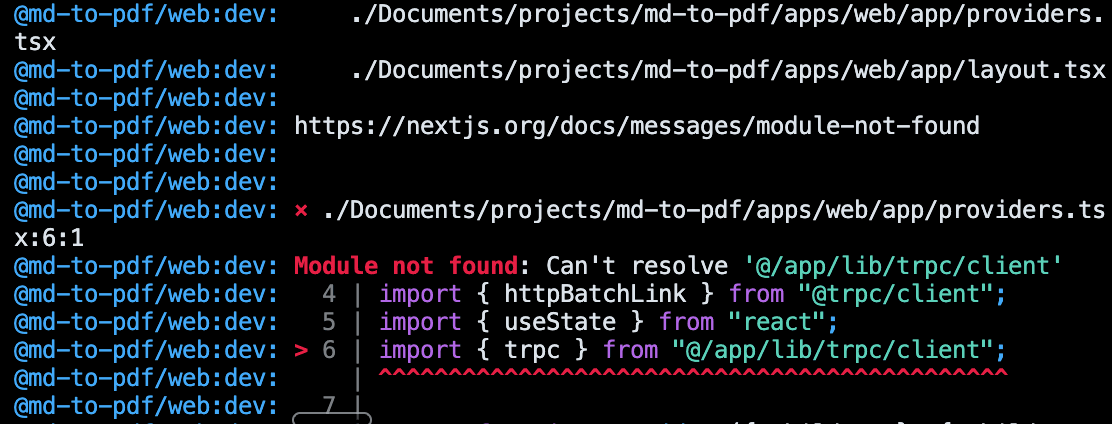
AI is taking over the world. Ideas that once were nothing but imagination floating in the air can now be turned into actual products that anyone around the world can use with a simple thought. If you had the chance—the opportunity—wouldn't you want to create the next billion-dollar product without having to spend thousands of dollars hiring engineers? Well, if that's your dream, let me take you down a little rabbit hole I stumbled into while trying to automate markdown to PDF.
FYI, this hook was written with speech-to-text using Wispr Flow.
Earlier tonight, I was chaining a couple of prompts using NotebookLM and Claude. To make a long story short, the output I wanted was in markdown that I would parse into a Doc for a final PDF file. The flow was going well until I noticed that Claude wasn't delivering the result I needed. At that exact moment, I decided to test ChatGPT and Gemini—both failed.
Alternatively, I found a web app that did exactly what I needed, until I had to modify my text, which triggered a paywall. Not good! I didn't like that one bit, and I was too tired after a long week of work to dive into a research rabbit hole. Furthermore, I was bored. Thus, an idea popped into my head—Eureka! Let's just build the solution.
It's 7 PM Friday night, the kids have too much energy, and the holiday vacation has begun. Should I do this from scratch? Yes, maybe—but wait! That's when I remembered: vibe coding was a "thing," and although I see that feature literally every day, I'd never attempted it even once. The opportunity presented itself, and I had to seize it! And I did!
I know how this goes—I've seen it before. First, you must start with a plan. So I toggled the agent panel and gave it some basic instructions, starting with a short markdown file:
# Project objective
user types in markdown compatible text field and it shows formatted preview on the right half of the screen.
The formatted preview can be converted to pdf and downloaded.
# infrastructure
- Monorepo
# frontend
- Nextjs 16
- Tailwindcss
- Shadcn
# backend
- trpcs
- supabaseFrom there, I started guiding it to build a plan for the solution: adding packages, system design, UI components, state management, auth, ORM, tRPC! That resulted in:
Project objective
user types in markdown compatible text field and it shows formatted preview on the right half of the screen.
The formatted preview can be converted to pdf and downloaded.
infrastructure
Frontend
Backend
Environment Management
Architecture Principles
features/shared for shared UI components, hooks, types, server functionsMonorepo Structuremd-to-pdf/
├── apps/
│ └── web/ # Next.js 16 application
│ ├── app/ # Next.js app router (page components)
│ │ ├── page.tsx # Main editor page
│ │ ├── documents/
│ │ │ └── [id]/
│ │ │ └── page.tsx # Document detail page
│ │ └── layout.tsx # Root layout
│ ├── features/ # Feature-based organization
│ │ ├── editor/ # Markdown editor feature
│ │ │ ├── components/ # Feature components
│ │ │ │ └── Editor.tsx
│ │ │ ├── hooks/ # Feature hooks
│ │ │ │ └── useEditor.ts
│ │ │ ├── server/ # Server functions (tRPC procedures)
│ │ │ │ └── editor.ts
│ │ │ ├── client/ # Client-side utilities
│ │ │ │ └── editor-client.ts
│ │ │ ├── types.ts # Feature types
│ │ │ ├── constants.ts # Feature constants
│ │ │ └── utils.ts # Feature utilities
│ │ ├── preview/ # Preview pane feature
│ │ │ ├── components/
│ │ │ │ └── Preview.tsx
│ │ │ ├── hooks/
│ │ │ │ └── usePreview.ts
│ │ │ ├── server/
│ │ │ ├── client/
│ │ │ ├── types.ts
│ │ │ ├── constants.ts
│ │ │ └── utils.ts
│ │ ├── pdf-export/ # PDF export feature
│ │ │ ├── components/
│ │ │ │ └── PDFExporter.tsx
│ │ │ ├── hooks/
│ │ │ │ └── usePDFExport.ts
│ │ │ ├── server/
│ │ │ ├── client/
│ │ │ │ └── pdf-generator.ts
│ │ │ ├── types.ts
│ │ │ ├── constants.ts
│ │ │ └── utils.ts
│ │ ├── document/ # Document persistence feature
│ │ │ ├── components/
│ │ │ │ ├── DocumentList.tsx
│ │ │ │ └── DocumentSave.tsx
│ │ │ ├── hooks/
│ │ │ │ └── useDocument.ts
│ │ │ ├── server/
│ │ │ │ └── document.ts # tRPC procedures
│ │ │ ├── client/
│ │ │ ├── types.ts
│ │ │ ├── constants.ts
│ │ │ └── utils.ts
│ │ ├── auth/ # Authentication feature
│ │ │ ├── components/
│ │ │ │ ├── LoginForm.tsx
│ │ │ │ ├── SignUpForm.tsx
│ │ │ │ └── UserMenu.tsx
│ │ │ ├── hooks/
│ │ │ │ ├── useAuth.ts
│ │ │ │ └── useSession.ts
│ │ │ ├── server/
│ │ │ │ └── auth.ts # Auth server utilities
│ │ │ ├── client/
│ │ │ │ └── auth-client.ts # Supabase auth client
│ │ │ ├── types.ts
│ │ │ ├── constants.ts
│ │ │ └── utils.ts
│ │ └── shared/ # Shared UI feature
│ │ ├── components/ # Shared UI components (ShadCN + Craft DS)
│ │ │ ├── ds/ # Craft Design System components
│ │ │ │ ├── Layout.tsx
│ │ │ │ ├── Main.tsx
│ │ │ │ ├── Section.tsx
│ │ │ │ ├── Container.tsx
│ │ │ │ ├── Nav.tsx
│ │ │ │ └── Prose.tsx
│ │ │ ├── Button.tsx # ShadCN components
│ │ │ ├── Input.tsx
│ │ │ └── ...
│ │ ├── hooks/
│ │ │ └── useDebounce.ts
│ │ ├── server/
│ │ ├── client/
│ │ ├── types.ts
│ │ ├── constants.ts
│ │ └── utils.ts
│ ├── lib/ # Low-level utilities (non-UI)
│ │ ├── db/ # Database client & schema
│ │ │ ├── client.ts # Drizzle client
│ │ │ └── schema.ts # Drizzle schema
│ │ ├── env/ # Environment variables
│ │ │ └── env.ts
│ │ ├── trpc/ # tRPC setup
│ │ │ ├── client.ts # tRPC client
│ │ │ └── server.ts # tRPC server setup
│ │ ├── stores/ # Zustand stores
│ │ │ ├── editor-store.ts # Editor state store
│ │ │ ├── auth-store.ts # Auth state store
│ │ │ └── ui-store.ts # UI state store
│ │ └── supabase/ # Supabase client
│ │ └── client.ts
│ └── styles/ # Global styles
│ └── globals.css
├── packages/
│ ├── api/ # tRPC router & procedures
│ │ ├── src/
│ │ │ ├── router/ # tRPC routers (imports from features)
│ │ │ │ └── index.ts # Root router
│ │ │ └── trpc.ts # tRPC initialization
│ │ └── package.json
│ ├── config/ # Shared configs
│ │ ├── eslint/
│ │ ├── typescript/
│ │ └── tailwind/
│ └── types/ # Shared TypeScript types
├── turbo.json
└── package.json
Component Hierarchy & Data FlowComponent Layers
app/*/page.tsx)features/*/components/*.tsx)features/sharedfeatures/shared/components/*.tsx)Data Flow Exampleapp/page.tsx (Server Component)
↓ fetches data
↓ passes to feature components
features/editor/components/Editor.tsx
↓ uses hook
features/editor/hooks/useEditor.ts
↓ uses client utility
features/editor/client/editor-client.ts
Fetching Strategy
app/*/page.tsx using server functionsFeature BreakdownFeature: editor
Responsibility: Markdown text input and editing
Components
Editor.tsx - Single responsibility: renders markdown textareaHooks
useEditor.ts - Single responsibility: manages editor state (content, cursor position)Server
Client
editor-client.ts - Utilities for editor operations (syntax highlighting, etc.)Types
EditorState, EditorConfigConstants
Utils
Feature: preview
Responsibility: Live markdown preview rendering
Components
Preview.tsx - Single responsibility: renders markdown as HTMLHooks
usePreview.ts - Single responsibility: converts markdown to HTMLServer
Client
preview-client.ts - Markdown parsing utilitiesTypes
PreviewConfig, PreviewOptionsConstants
Utils
Feature: pdf-export
Responsibility: PDF generation and download
Components
PDFExporter.tsx - Single responsibility: renders export button/controlsHooks
usePDFExport.ts - Single responsibility: handles PDF generation and downloadServer
Client
pdf-generator.ts - Single responsibility: converts markdown/HTML to PDF using @react-pdf/rendererTypes
PDFOptions, PDFConfigConstants
Utils
Feature: document
Responsibility: Document persistence (save/load)
Components
DocumentList.tsx - Single responsibility: renders list of saved documentsDocumentSave.tsx - Single responsibility: renders save document formHooks
useDocument.ts - Single responsibility: manages document CRUD operationsServer
document.ts - tRPC procedures:create - Create documentgetById - Get document by IDupdate - Update documentdelete - Delete documentlist - List user documentsClient
document-client.ts - Client-side document utilitiesTypes
Document, DocumentInput, DocumentListResponseConstants
Utils
Feature: auth
Responsibility: User authentication and session management
Components
LoginForm.tsx - Single responsibility: renders login formSignUpForm.tsx - Single responsibility: renders sign up formUserMenu.tsx - Single responsibility: renders user menu/dropdownHooks
useAuth.ts - Single responsibility: manages authentication state and actions (login, signup, logout)useSession.ts - Single responsibility: manages current user sessionServer
auth.ts - Server-side auth utilities (session validation, protected routes)Client
auth-client.ts - Supabase auth client configuration and utilitiesTypes
User, Session, AuthStateConstants
Utils
Feature: shared
Responsibility: Shared UI components and utilities
Components
Layout.tsx - Root layout component with base stylingMain.tsx - Primary content areaSection.tsx - Semantic section container with vertical paddingContainer.tsx - Centers content with max width and paddingNav.tsx - Navigation containerProse.tsx - Rich text content with comprehensive typography stylingHooks
useDebounce.ts - Single responsibility: debounce valuesServer
Client
Types
Constants
Utils
Craft Design System Usage
Craft Design System provides layout components and prose handling. It's compatible with shadcn/ui and works seamlessly with Tailwind CSS.
Layout Setup
Location: apps/web/app/layout.tsx
import { Google_Sans, Google_Sans_Flex } from "next/font/google";
import { Layout } from "@/app/features/shared/components/ds/Layout";
const googleSans = Google_Sans({
subsets: ["latin"],
variable: "--font-google-sans",
display: "swap",
});
const googleSansFlex = Google_Sans_Flex({
subsets: ["latin"],
variable: "--font-google-sans-flex",
display: "swap",
});
export default function RootLayout({
children,
}: {
children: React.ReactNode;
}) {
return (
<html
lang="en"
className={`${googleSans.variable} ${googleSansFlex.variable}`}
>
<Layout>{children}</Layout>
</html>
);
}
Component UsageMain Layout Structureimport { Main, Section, Container } from "@/app/features/shared/components/ds";
export default function Page() {
return (
<Main>
<Section>
<Container>{/* Page content */}</Container>
</Section>
</Main>
);
}
Navigationimport { Nav } from "@/app/features/shared/components/ds";
<Nav>
<div>Logo</div>
<ul>
<li>
<a href="/">Home</a>
</li>
<li>
<a href="/documents">Documents</a>
</li>
</ul>
</Nav>;
Prose Component (for Markdown Preview)
The Prose component is ideal for rendering markdown content with comprehensive typography styling:
import { Prose } from "@/app/features/shared/components/ds";
// In Preview feature component
<Prose isArticle={true} isSpaced={true}>
{/* Rendered markdown content */}
</Prose>;
Prose Features:
Integration with FeaturesEditor Layout
Use Craft components for the split-view editor layout:
import { Main, Section, Container } from "@/app/features/shared/components/ds";
<Main>
<Section>
<Container className="grid grid-cols-2 gap-4">
<EditorFeature />
<PreviewFeature />
</Container>
</Section>
</Main>;
Document Pages
Use Prose for document content display:
import { Prose } from "@/app/features/shared/components/ds";
<Prose isArticle={true} isSpaced={true}>
<h1>{document.title}</h1>
{/* Document content */}
</Prose>;
Component Props
All Craft components accept:
className - Custom Tailwind classeschildren - React childrenid - HTML id attributestyle - Inline stylescontainerClassName - For Nav componentisArticle - For Prose (renders as <article>)isSpaced - For Prose (adds vertical spacing)Page Components/ (Main Editor Page)
File: app/page.tsx
Responsibility: Entry point for editor, fetches initial data
// Server component - fetches data at navigation layer
export default async function EditorPage() {
// Fetch initial data if needed (e.g., recent documents)
const recentDocs = await getRecentDocuments();
return (
<EditorLayout>
<EditorFeature />
<PreviewFeature />
<PDFExportFeature />
</EditorLayout>
);
}/documents/[id] (Document Detail Page)
File: app/documents/[id]/page.tsx
Responsibility: Loads and displays saved document
// Server component - fetches document data
export default async function DocumentPage({ params }) {
const document = await getDocumentById(params.id);
return (
<DocumentLayout>
<DocumentFeature document={document} />
<EditorFeature initialContent={document.content} />
<PreviewFeature />
</DocumentLayout>
);
}
Database Setup (Drizzle + Supabase)Schema Definition
Location: apps/web/lib/db/schema.ts
import { pgTable, uuid, text, timestamp } from "drizzle-orm/pg-core";
export const documents = pgTable("documents", {
id: uuid("id").defaultRandom().primaryKey(),
userId: uuid("user_id").notNull(),
title: text("title").notNull(),
content: text("content").notNull(),
createdAt: timestamp("created_at").defaultNow().notNull(),
updatedAt: timestamp("updated_at").defaultNow().notNull(),
});
export type Document = typeof documents.$inferSelect;
export type NewDocument = typeof documents.$inferInsert;
Database Client
Location: apps/web/lib/db/client.ts
import { drizzle } from "drizzle-orm/postgres-js";
import postgres from "postgres";
import * as schema from "@/app/lib/db/schema";
import { env } from "@/app/lib/env/env";
// Disable prefetch as it is not supported for "Transaction" pool mode
const client = postgres(env.DATABASE_URL, { prepare: false });
export const db = drizzle(client, { schema });
Drizzle Configuration
Location: apps/web/drizzle.config.ts
import type { Config } from "drizzle-kit";
import { env } from "./lib/env/env";
export default {
schema: "./lib/db/schema.ts",
out: "./drizzle",
dialect: "postgresql",
dbCredentials: {
url: env.DATABASE_URL,
},
} satisfies Config;
Environment Variables Setup
Location: apps/web/lib/env/env.ts
Using @t3-oss/env-nextjs for type-safe environment variable validation:
import { createEnv } from "@t3-oss/env-nextjs";
import { z } from "zod";
export const env = createEnv({
server: {
DATABASE_URL: z.string().url(),
SUPABASE_URL: z.string().url(),
SUPABASE_ANON_KEY: z.string().min(1),
SUPABASE_SERVICE_ROLE_KEY: z.string().min(1).optional(), // For server-side operations
},
client: {
NEXT_PUBLIC_SUPABASE_URL: z.string().url(),
NEXT_PUBLIC_SUPABASE_ANON_KEY: z.string().min(1),
},
// For Next.js >= 13.4.4, you only need to destructure client variables:
experimental__runtimeEnv: {
NEXT_PUBLIC_SUPABASE_URL: process.env.NEXT_PUBLIC_SUPABASE_URL,
NEXT_PUBLIC_SUPABASE_ANON_KEY: process.env.NEXT_PUBLIC_SUPABASE_ANON_KEY,
},
// For Next.js < 13.4.4, specify runtimeEnv manually:
runtimeEnv: {
DATABASE_URL: process.env.DATABASE_URL,
SUPABASE_URL: process.env.SUPABASE_URL,
SUPABASE_ANON_KEY: process.env.SUPABASE_ANON_KEY,
SUPABASE_SERVICE_ROLE_KEY: process.env.SUPABASE_SERVICE_ROLE_KEY,
NEXT_PUBLIC_SUPABASE_URL: process.env.NEXT_PUBLIC_SUPABASE_URL,
NEXT_PUBLIC_SUPABASE_ANON_KEY: process.env.NEXT_PUBLIC_SUPABASE_ANON_KEY,
},
});
Location: apps/web/.env.local
DATABASE_URL="postgresql://user:password@host:port/database"
SUPABASE_URL="https://your-project.supabase.co"
SUPABASE_ANON_KEY="your-anon-key"
SUPABASE_SERVICE_ROLE_KEY="your-service-role-key" # Optional, for server-side operations
# Client-side variables (must be prefixed with NEXT_PUBLIC_)
NEXT_PUBLIC_SUPABASE_URL="https://your-project.supabase.co"
NEXT_PUBLIC_SUPABASE_ANON_KEY="your-anon-key"
Important: Import the env file in next.config.ts to validate environment variables at build time (see Next.js Configuration section).
Migration Commands# Generate migration
bunx drizzle-kit generate
# Run migration
bunx drizzle-kit push
# View migrations
bunx drizzle-kit studio
Supabase Auth SetupClient Configuration
Location: apps/web/lib/supabase/client.ts
import { createBrowserClient } from "@supabase/ssr";
import { env } from "@/app/lib/env/env";
export const createClient = () => {
return createBrowserClient(
env.NEXT_PUBLIC_SUPABASE_URL,
env.NEXT_PUBLIC_SUPABASE_ANON_KEY
);
};
Server Client Configuration
Location: apps/web/lib/supabase/server.ts
import { createServerClient } from "@supabase/ssr";
import { cookies } from "next/headers";
import { env } from "@/app/lib/env/env";
export const createClient = async () => {
const cookieStore = await cookies();
return createServerClient(
env.NEXT_PUBLIC_SUPABASE_URL,
env.NEXT_PUBLIC_SUPABASE_ANON_KEY,
{
cookies: {
getAll() {
return cookieStore.getAll();
},
setAll(cookiesToSet) {
try {
cookiesToSet.forEach(({ name, value, options }) => {
cookieStore.set(name, value, options);
});
} catch (error) {
// The `setAll` method was called from a Server Component.
// This can be ignored if you have middleware refreshing
// user sessions.
}
},
},
}
);
};
Middleware for Session Refresh
Location: apps/web/middleware.ts
import { createServerClient } from "@supabase/ssr";
import { NextResponse, type NextRequest } from "next/server";
import { env } from "@/app/lib/env/env";
export async function middleware(request: NextRequest) {
let response = NextResponse.next({
request: {
headers: request.headers,
},
});
const supabase = createServerClient(
env.NEXT_PUBLIC_SUPABASE_URL,
env.NEXT_PUBLIC_SUPABASE_ANON_KEY,
{
cookies: {
getAll() {
return request.cookies.getAll();
},
setAll(cookiesToSet) {
cookiesToSet.forEach(({ name, value, options }) => {
request.cookies.set(name, value);
});
response = NextResponse.next({
request,
});
cookiesToSet.forEach(({ name, value, options }) => {
response.cookies.set(name, value, options);
});
},
},
}
);
await supabase.auth.getUser();
return response;
}
export const config = {
matcher: [
/*
* Match all request paths except for the ones starting with:
* - _next/static (static files)
* - _next/image (image optimization files)
* - favicon.ico (favicon file)
* Feel free to modify this pattern to include more paths.
*/
"/((?!_next/static|_next/image|favicon.ico|.*\\.(?:svg|png|jpg|jpeg|gif|webp)$).*)",
],
};
Auth Feature Client
Location: apps/web/features/auth/client/auth-client.ts
import { createClient } from "@/app/lib/supabase/client";
export const supabase = createClient();
// Auth helper functions
export const signIn = async (email: string, password: string) => {
const { data, error } = await supabase.auth.signInWithPassword({
email,
password,
});
return { data, error };
};
export const signUp = async (email: string, password: string) => {
const { data, error } = await supabase.auth.signUp({
email,
password,
});
return { data, error };
};
export const signOut = async () => {
const { error } = await supabase.auth.signOut();
return { error };
};
export const getSession = async () => {
const {
data: { session },
error,
} = await supabase.auth.getSession();
return { session, error };
};
export const getUser = async () => {
const {
data: { user },
error,
} = await supabase.auth.getUser();
return { user, error };
};
Auth Hook
Location: apps/web/features/auth/hooks/useAuth.ts
"use client";
import { useEffect, useState } from "react";
import { useRouter } from "next/navigation";
import type { User, Session } from "@supabase/supabase-js";
import {
getSession,
signIn,
signUp,
signOut,
} from "@/app/features/auth/client/auth-client";
export function useAuth() {
const [user, setUser] = useState<User | null>(null);
const [session, setSession] = useState<Session | null>(null);
const [loading, setLoading] = useState(true);
const router = useRouter();
useEffect(() => {
getSession().then(({ session, error }) => {
if (error) {
console.error("Error getting session:", error);
setLoading(false);
return;
}
setSession(session);
setUser(session?.user ?? null);
setLoading(false);
});
}, []);
const handleSignIn = async (email: string, password: string) => {
const { data, error } = await signIn(email, password);
if (error) {
return { error };
}
if (data.session) {
setSession(data.session);
setUser(data.session.user);
router.refresh();
}
return { data, error };
};
const handleSignUp = async (email: string, password: string) => {
const { data, error } = await signUp(email, password);
if (error) {
return { error };
}
if (data.session) {
setSession(data.session);
setUser(data.session.user);
router.refresh();
}
return { data, error };
};
const handleSignOut = async () => {
const { error } = await signOut();
if (error) {
return { error };
}
setSession(null);
setUser(null);
router.refresh();
return { error };
};
return {
user,
session,
loading,
signIn: handleSignIn,
signUp: handleSignUp,
signOut: handleSignOut,
};
}
tRPC SetupRouter Structure
Location: packages/api/src/router/index.ts
import { router } from "@trpc/server";
import { documentRouter } from "@/app/features/document/server/document";
export const appRouter = router({
document: documentRouter,
});
export type AppRouter = typeof appRouter;
Each feature's server folder contains its tRPC procedures, which are imported into the root router.
Server Setup
Location: apps/web/lib/trpc/server.ts
import { initTRPC } from "@trpc/server";
import { db } from "@/app/lib/db/client";
const t = initTRPC.context<{ db: typeof db }>().create();
export const router = t.router;
export const publicProcedure = t.procedure;
Client Setup
Location: apps/web/lib/trpc/client.ts
import { createTRPCReact } from "@trpc/react-query";
import type { AppRouter } from "@/packages/api/src/router";
export const trpc = createTRPCReact<AppRouter>();
Next.js App Router Integration
Location: apps/web/app/api/trpc/[trpc]/route.ts
import { fetchRequestHandler } from "@trpc/server/adapters/fetch";
import { appRouter } from "@/packages/api/src/router";
import { db } from "@/app/lib/db/client";
const handler = (req: Request) =>
fetchRequestHandler({
endpoint: "/api/trpc",
req,
router: appRouter,
createContext: () => ({ db }),
});
export { handler as GET, handler as POST };
React Query Provider
Location: apps/web/app/providers.tsx
"use client";
import { QueryClient, QueryClientProvider } from "@tanstack/react-query";
import { httpBatchLink } from "@trpc/client";
import { useState } from "react";
import { trpc } from "@/app/lib/trpc/client";
export function Providers({ children }: { children: React.ReactNode }) {
const [queryClient] = useState(() => new QueryClient());
const [trpcClient] = useState(() =>
trpc.createClient({
links: [
httpBatchLink({
url: "/api/trpc",
}),
],
})
);
return (
<trpc.Provider client={trpcClient} queryClient={queryClient}>
<QueryClientProvider client={queryClient}>{children}</QueryClientProvider>
</trpc.Provider>
);
}
Location: apps/web/app/layout.tsx
import { Google_Sans, Google_Sans_Flex } from "next/font/google";
import { Providers } from "@/app/providers";
const googleSans = Google_Sans({
subsets: ["latin"],
variable: "--font-google-sans",
display: "swap",
});
const googleSansFlex = Google_Sans_Flex({
subsets: ["latin"],
variable: "--font-google-sans-flex",
display: "swap",
});
export default function RootLayout({
children,
}: {
children: React.ReactNode;
}) {
return (
<html
lang="en"
className={`${googleSans.variable} ${googleSansFlex.variable}`}
>
<body>
<Providers>{children}</Providers>
</body>
</html>
);
}
Google Fonts ConfigurationFont Setup
The project uses Google Sans and Google Sans Flex fonts from Google Fonts, integrated with Next.js and TailwindCSS.
Installation
Google Fonts are loaded via Next.js's built-in next/font/google optimization.
Font Configuration
Location: apps/web/app/layout.tsx
import { Google_Sans, Google_Sans_Flex } from "next/font/google";
import { Providers } from "@/app/providers";
const googleSans = Google_Sans({
subsets: ["latin"],
variable: "--font-google-sans",
display: "swap",
});
const googleSansFlex = Google_Sans_Flex({
subsets: ["latin"],
variable: "--font-google-sans-flex",
display: "swap",
});
export default function RootLayout({
children,
}: {
children: React.ReactNode;
}) {
return (
<html
lang="en"
className={`${googleSans.variable} ${googleSansFlex.variable}`}
>
<body>
<Providers>{children}</Providers>
</body>
</html>
);
}
TailwindCSS Configuration
Location: apps/web/tailwind.config.ts
import type { Config } from "tailwindcss";
const config: Config = {
theme: {
extend: {
fontFamily: {
sans: ["var(--font-google-sans)", "sans-serif"],
"sans-flex": ["var(--font-google-sans-flex)", "sans-serif"],
},
},
},
// ... rest of your Tailwind config
};
export default config;
UsageIn Components// Using Google Sans (default sans font)
<div className="font-sans">Text with Google Sans</div>
// Using Google Sans Flex
<div className="font-sans-flex">Text with Google Sans Flex</div>
In Craft Design System Components
Craft components will automatically use the configured fonts through TailwindCSS:
import { Prose, Container } from "@/app/features/shared/components/ds";
<Container className="font-sans">
<Prose>
<h1>Heading with Google Sans</h1>
<p>Body text with Google Sans</p>
</Prose>
</Container>;
Custom Font Usage// Mix fonts as needed
<div className="font-sans text-2xl">Google Sans Heading</div>
<div className="font-sans-flex text-base">Google Sans Flex Body</div>
Font Variables
The fonts are available as CSS variables:
--font-google-sans - Google Sans font family--font-google-sans-flex - Google Sans Flex font familyThese can be used directly in CSS or with Tailwind's font-sans and font-sans-flex utilities.
Zustand State Management
Zustand is a small, fast, and scalable state management solution with a comfy API based on hooks. It's lightweight and perfect for managing global application state.
Store Structure
Stores are located in apps/web/lib/stores/ and follow the single responsibility principle.
Editor Store
Location: apps/web/lib/stores/editor-store.ts
import { create } from "zustand";
interface EditorState {
content: string;
cursorPosition: number;
setContent: (content: string) => void;
setCursorPosition: (position: number) => void;
reset: () => void;
}
export const useEditorStore = create<EditorState>((set) => ({
content: "",
cursorPosition: 0,
setContent: (content) => set({ content }),
setCursorPosition: (position) => set({ cursorPosition: position }),
reset: () => set({ content: "", cursorPosition: 0 }),
}));
Auth Store
Location: apps/web/lib/stores/auth-store.ts
import { create } from "zustand";
import type { User, Session } from "@supabase/supabase-js";
interface AuthState {
user: User | null;
session: Session | null;
loading: boolean;
setUser: (user: User | null) => void;
setSession: (session: Session | null) => void;
setLoading: (loading: boolean) => void;
clear: () => void;
}
export const useAuthStore = create<AuthState>((set) => ({
user: null,
session: null,
loading: true,
setUser: (user) => set({ user }),
setSession: (session) => set({ session }),
setLoading: (loading) => set({ loading }),
clear: () => set({ user: null, session: null, loading: false }),
}));
UI Store
Location: apps/web/lib/stores/ui-store.ts
import { create } from "zustand";
interface UIState {
sidebarOpen: boolean;
theme: "light" | "dark";
toggleSidebar: () => void;
setTheme: (theme: "light" | "dark") => void;
}
export const useUIStore = create<UIState>((set) => ({
sidebarOpen: false,
theme: "light",
toggleSidebar: () => set((state) => ({ sidebarOpen: !state.sidebarOpen })),
setTheme: (theme) => set({ theme }),
}));
Usage in ComponentsSelecting State"use client";
import { useEditorStore } from "@/app/lib/stores/editor-store";
export function Editor() {
// Select only the state you need - component re-renders only when this changes
const content = useEditorStore((state) => state.content);
const setContent = useEditorStore((state) => state.setContent);
return (
<textarea value={content} onChange={(e) => setContent(e.target.value)} />
);
}
Using Multiple Stores"use client";
import { useEditorStore } from "@/app/lib/stores/editor-store";
import { useAuthStore } from "@/app/lib/stores/auth-store";
export function EditorWithAuth() {
const content = useEditorStore((state) => state.content);
const user = useAuthStore((state) => state.user);
const setContent = useEditorStore((state) => state.setContent);
if (!user) {
return <div>Please log in</div>;
}
return (
<textarea value={content} onChange={(e) => setContent(e.target.value)} />
);
}
Using Actions"use client";
import { useEditorStore } from "@/app/lib/stores/editor-store";
export function EditorControls() {
const reset = useEditorStore((state) => state.reset);
const setCursorPosition = useEditorStore((state) => state.setCursorPosition);
return (
<div>
<button onClick={reset}>Reset</button>
<button onClick={() => setCursorPosition(0)}>Go to Start</button>
</div>
);
}
Integration with FeaturesEditor Feature
The editor feature can use the Zustand store instead of local state:
"use client";
import { useEditorStore } from "@/app/lib/stores/editor-store";
import { useEffect } from "react";
export function Editor() {
const { content, setContent, setCursorPosition } = useEditorStore();
// Sync with external changes if needed
useEffect(() => {
// Any side effects based on store changes
}, [content]);
return (
<textarea
value={content}
onChange={(e) => {
setContent(e.target.value);
setCursorPosition(e.target.selectionStart);
}}
/>
);
}
Auth Feature
The auth feature can integrate with the Zustand store:
"use client";
import { useAuthStore } from "@/app/lib/stores/auth-store";
import { useEffect } from "react";
import { getSession } from "@/app/features/auth/client/auth-client";
export function AuthProvider({ children }: { children: React.ReactNode }) {
const { setUser, setSession, setLoading } = useAuthStore();
useEffect(() => {
getSession().then(({ session, error }) => {
if (error) {
setLoading(false);
return;
}
setSession(session);
setUser(session?.user ?? null);
setLoading(false);
});
}, [setUser, setSession, setLoading]);
return <>{children}</>;
}
Best Practices
TypeScript ConfigurationTypeScript SetupRequirements
next.config.ts)Note: Always use the latest stable versions. Check package versions with bun outdated or visit npm registry pages.
Path Aliases
Location: apps/web/tsconfig.json and packages/api/tsconfig.json
TypeScript must be configured with the following path aliases:
{
"compilerOptions": {
"baseUrl": ".",
"paths": {
"@/app/*": ["./apps/web/*"],
"@/packages/*": ["./packages/*"]
},
"incremental": true
}
}
Note: baseUrl is required for path aliases to work correctly. incremental enables faster type checking for larger applications.
Usage Examples// In apps/web
import { Button } from "@/app/features/shared/components/Button";
import { useEditor } from "@/app/features/editor/hooks/useEditor";
import { db } from "@/app/lib/db/client";
// In packages/api
import { documentRouter } from "@/app/features/document/server/document";
Next.js Configuration
Location: apps/web/next.config.ts (TypeScript format)
Next.js configuration must use TypeScript format (next.config.ts):
import type { NextConfig } from "next";
import path from "path";
// Import env here to validate during build time
// This ensures environment variables are validated at build time
import "./lib/env/env";
const nextConfig: NextConfig = {
// Enable statically typed routes for type-safe navigation
typedRoutes: true,
// Configure webpack to resolve path aliases
webpack: (config) => {
config.resolve.alias = {
...config.resolve.alias,
"@/app": path.resolve(__dirname, "."),
"@/packages": path.resolve(__dirname, "../packages"),
};
return config;
},
// TypeScript configuration
typescript: {
// Fail build on TypeScript errors (recommended)
ignoreBuildErrors: false,
},
};
export default nextConfig;
Important Notes:
next.config.ts (not .js or .mjs) for TypeScript supporttypedRoutes: true enables compile-time type checking for route pathsNODE_OPTIONS=--experimental-transform-typesTurbo Repo Configuration
Location: Root tsconfig.json
For monorepo setups, configure TypeScript at the root level:
{
"compilerOptions": {
"baseUrl": ".",
"paths": {
"@/app/*": ["./apps/web/*"],
"@/packages/*": ["./packages/*"]
}
},
"references": [{ "path": "./apps/web" }, { "path": "./packages/api" }]
}
Location: apps/web/tsconfig.json
Extend from root and add Next.js specific settings:
{
"extends": "../../tsconfig.json",
"compilerOptions": {
"target": "ES2020",
"lib": ["dom", "dom.iterable", "esnext"],
"allowJs": true,
"skipLibCheck": true,
"strict": true,
"noEmit": true,
"esModuleInterop": true,
"module": "esnext",
"moduleResolution": "bundler",
"resolveJsonModule": true,
"isolatedModules": true,
"jsx": "preserve",
"incremental": true,
"plugins": [
{
"name": "next"
}
],
"paths": {
"@/app/*": ["./*"],
"@/packages/*": ["../../packages/*"]
}
},
"include": ["next-env.d.ts", "**/*.ts", "**/*.tsx", ".next/types/**/*.ts"],
"exclude": ["node_modules"]
}
Development WorkflowSetup Steps
@latest to get the most recent versions):bun add next@latest react@latest react-dom@latest @types/react@latest @types/react-dom@latest @types/node@latest @t3-oss/env-nextjs@latest zod@latest zustand@latest @tanstack/react-query@latest @trpc/client@latest @trpc/react-query@latest @trpc/next@latest @react-pdf/renderer@latest react-markdown@latest remark-gfm@latest tailwindcss@latestbun add -d typescript@latest turbo@latestbun add @trpc/server@latest drizzle-orm@latest @supabase/supabase-js@latest @supabase/ssr@latest drizzle-kit@latest postgres@latesttsconfig.json (@/app, @/packages)tsconfig.json with Next.js settingslib/env/env.ts with @t3-oss/env-nextjs schema.env.local with required variablesnext.config.ts (TypeScript format) with:typedRoutes: true for type-safe navigationlib/supabase/client.ts)lib/supabase/server.ts)middleware.ts)features/auth/client/auth-client.ts)features/auth/hooks/useAuth.ts)tailwind.config.tsapp/layout.tsxbunx shadcn@latest initbunx craft-ds@latest init (requires shadcn/ui)Bun CommandsPackage Management# Install dependencies
bun install
# Add a dependency
bun add <package>
# Add a dev dependency
bun add -d <package>
# Remove a dependency
bun remove <package>
Development# Run development server
bun dev
# Run build
bun build
# Run production server
bun start
Scripts# Run scripts defined in package.json
bun run <script-name>
# Run with bunx (similar to npx)
bunx <package>
Version Management# Check for outdated packages
bun outdated
# Update all dependencies to latest versions
bun update
# Update a specific package to latest
bun add <package>@latest
# Upgrade Bun itself
bun upgrade
Key Dependencies
Note: Package versions change frequently. Always check for the latest stable versions before installation. Use bun add <package>@latest to get the most recent version, or visit the package's npm page for version information.
System Requirements
bun upgrade to update)Root
turbo@latest - Monorepo build systemtypescript@latest - TypeScript support (minimum 5.1.3 required for async Server Components, latest is 5.6+)@types/node@latest - Node.js type definitionsFrontend (apps/web)
next@latest - Next.js framework (latest stable: 16.0.7+)react@latest - React library (latest: 19.x)react-dom@latest - React DOM (latest: 19.x)@types/react@latest - React type definitions (latest: 19.x, minimum 18.2.8 required)@types/react-dom@latest - React DOM type definitions (latest: 19.x)@t3-oss/env-nextjs@latest - Type-safe environment variables (latest: 0.13.8+) (docs)zod@latest - Schema validation for environment variableszustand@latest - State management (docs)@tanstack/react-query@latest - For tRPC client and data fetching (latest: 5.x)@trpc/client@latest, @trpc/react-query@latest, @trpc/next@latest - tRPC client libraries (latest: 11.x)@react-pdf/renderer@latest - PDF generationreact-markdown@latest - Markdown renderingremark-gfm@latest - GitHub Flavored Markdown supporttailwindcss@latest - CSS frameworkshadcn/ui - UI component library (install via CLI: bunx shadcn@latest init)craft-ds@latest - Craft Design System for layouts and prose (install via CLI: bunx craft-ds@latest init) (docs, GitHub)Backend (packages/api)
@trpc/server@latest - tRPC server (latest: 11.x)drizzle-orm@latest - TypeScript ORM (latest: 1.5.0+)@supabase/supabase-js@latest - Supabase client@supabase/ssr@latest - Supabase SSR utilities for Next.js (required for auth)drizzle-kit@latest - Drizzle migrations and tooling (latest: 0.28.0+)postgres@latest or @neondatabase/serverless@latest - PostgreSQL driver (depending on Supabase setup)Installation Command
To install all dependencies with latest versions:
# Frontend dependencies
bun add next@latest react@latest react-dom@latest @types/react@latest @types/react-dom@latest @t3-oss/env-nextjs@latest zod@latest zustand@latest @tanstack/react-query@latest @trpc/client@latest @trpc/react-query@latest @trpc/next@latest @react-pdf/renderer@latest react-markdown@latest remark-gfm@latest tailwindcss@latest
# Backend dependencies
bun add @trpc/server@latest drizzle-orm@latest @supabase/supabase-js@latest @supabase/ssr@latest drizzle-kit@latest postgres@latest
# Dev dependencies
bun add -d typescript@latest @types/node@latest turbo@latest
# Initialize UI libraries (run after dependencies are installed)
bunx shadcn@latest init
bunx craft-ds@latest init
Note: Craft Design System requires shadcn/ui to be initialized first, as it uses shadcn's color system.
Implementation PhasesPhase 1: Foundation & Core EditorSetup
@latest for most recent versions):bun add next@latest react@latest react-dom@latest @types/react@latest @types/react-dom@latest @types/node@latest @t3-oss/env-nextjs@latest zod@latest @tanstack/react-query@latest @trpc/client@latest @trpc/react-query@latest @trpc/next@latest @react-pdf/renderer@latest react-markdown@latest remark-gfm@latest tailwindcss@latestbun add -d typescript@latest turbo@latestbun add @trpc/server@latest drizzle-orm@latest @supabase/supabase-js@latest drizzle-kit@latest postgres@latesttsconfig.json with path aliases (@/app, @/packages)tsconfig.json with Next.js settingslib/env/env.ts with @t3-oss/env-nextjs schema.env.local with required variables (DATABASE_URL, etc.)next.config.ts (TypeScript format) with:typedRoutes: true for type-safe navigationapp/layout.tsx using next/font/googletailwind.config.tsbunx shadcn@latest initbunx craft-ds@latest init (requires shadcn/ui)Editor Feature
features/editor structureEditor.tsx component (single responsibility)useEditor.ts hook (single responsibility)app/page.tsx)Preview Feature
features/preview structurePreview.tsx component (single responsibility)usePreview.ts hook (single responsibility)Layout
Phase 2: PDF Export Feature
features/pdf-export structurePDFExporter.tsx component (single responsibility)usePDFExport.ts hook (single responsibility)pdf-generator.ts client utility (single responsibility)Phase 3: Backend IntegrationDatabase Setup
lib/db/schema.tslib/db/client.tsAuthentication Setup
features/auth structurelib/supabase/client.ts)lib/supabase/server.ts)middleware.ts)features/auth/client/auth-client.ts)useAuth.ts hook (single responsibility)useSession.ts hook (single responsibility)LoginForm.tsx (single responsibility)SignUpForm.tsx (single responsibility)UserMenu.tsx (single responsibility)Document Feature
features/document structurefeatures/document/server/document.tscreate proceduregetById procedureupdate proceduredelete procedurelist procedureDocumentList.tsx component (single responsibility)DocumentSave.tsx component (single responsibility)useDocument.ts hook (single responsibility)packages/api/src/router/index.tsapp/documents/[id]/page.tsx)Data Fetching
Phase 4: Polish & Enhancement
# Project objective
user types in markdown compatible text field and it shows formatted preview on the right half of the screen.
The formatted preview can be converted to pdf and downloaded.
---
# infrastructure
- Turbo repo
- monorepo
- Bun (package manager and runtime)
## Frontend
- NextJs 16
- TailwindCSS
- Google Fonts (Google Sans, Google Sans Flex)
- Zustand - State management ([docs](https://zustand.docs.pmnd.rs/getting-started/introduction))
- ShadCN
- Craft Design System - Layout components and prose handling ([docs](https://craft-ds.com/), [GitHub](https://github.com/brijr/craft))
- @react-pdf/renderer
## Backend
- tRPC
- Drizzle
- Supabase
- Supabase Auth - User authentication
## Environment Management
- @t3-oss/env-nextjs - Type-safe environment variables with Zod validation
---
# Architecture Principles
1. **Organize by Features** - Each entity has its own feature folder with components, hooks, server, client, types, constants, utils
2. **Single Responsibility** - Components render 1 thing, hooks do 1 thing, utilities do 1 thing
3. **Component Hierarchy** - Page components → Feature components → UI components
4. **Fetch at Navigation Layer** - Fetch in server components/loaders, pass data down (or through React Query)
5. **Shared Feature Folder** - `features/shared` for shared UI components, hooks, types, server functions
6. **Lib Folder** - Low-level utilities (database, env, 3rd party clients) outside features

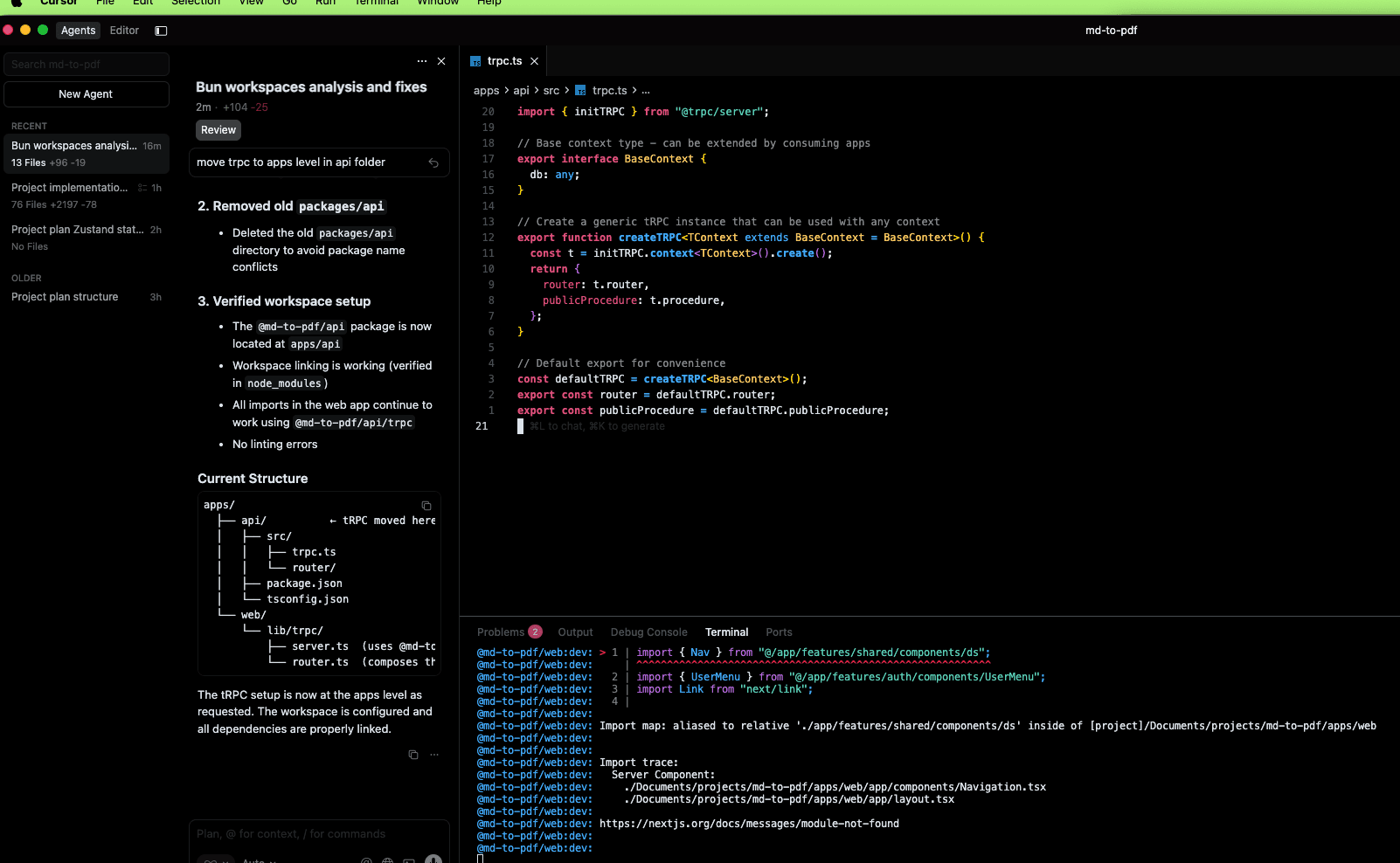
It didn't go as well as I thought it would—disappointed, but what did I expect? AI, let me scratch that, Large Language Models (LLMs) are bad with complexity, and to be honest, this isn't even that complex. On the bright side, it did build the foundation on which I will expand. But first, let me fix the errors:
LLMs are good at simple tasks and not good with what constitutes complexity for their capabilities. Don't get me wrong—they can build monsters—however, they can only successfully build what they've been trained on. Anything else is guessing where each piece of the puzzle fits. In short, they best serve their purpose as a tool that accelerates steps taken by a developer, writer, or noob to achieve a specific goal.
And I sure as hell will make it assist me!
I'll be back with more on this little adventure later. Time for Claude to correct this post draft. 😂